sensoCOMFORT
Use the controller's installer level. This is the main route on current systems fitted with a VRC 720.
Vaillant controls
Where to find it, which route applies and what the programme actually does.
Published
On a Vaillant system with sensoCOMFORT, the screed-drying control is in the installer level. The older VWZ AI /6 interface also has its own 29-day programme, but the current Series 8.1 VWZ AI /7 instructions do not show that standalone menu.
A newly laid floor already has enough drama without a mystery menu. The correct route depends on which Vaillant control is fitted, so identify that before changing anything.
Use the controller's installer level. This is the main route on current systems fitted with a VRC 720.
Without a system controller, use the appliance interface. It has the fixed 29-day profile described below.
The July 2025 interface manual does not list a standalone screed-drying function. On Series 8.1 with sensoCOMFORT, use the controller route.
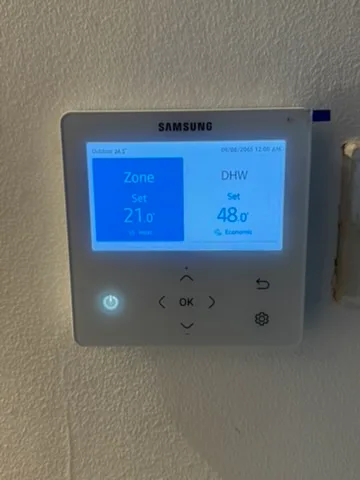
Vaillant puts the function in the installer level. The factory installer code is 00 unless it has been changed.
The profile sets a target flow temperature for each day. While the function is active, the controller regulates to that daily target independently of the outdoor temperature.
This is an installer and commissioning function, not an everyday user setting. Save the original configuration and agree the required temperatures and duration with the screed or flooring supplier before starting it.
This route applies to the older white aroTHERM plus /6 interface when there is no optional system controller. Press both selection buttons together to open the menu, then enter the installer level with code 17.
The display also shows Screed drying activ. when the programme is running. The selected day can be changed manually, but that should only be done as part of the agreed drying protocol.
Do not use this old button route for the current VWZ AI /7 interface. The present /7 instructions use a different control layout and do not list a standalone screed-drying menu.
That midnight change is easy to miss. Starting at 4pm does not give you a full 24 hours on day 1; the control moves to day 2 at 00:00.
The VWZ AI /6 manual gives the following fixed programme. It is useful for understanding the older interface, but it must not replace the screed manufacturer's own heating protocol.
| Day | Target flow temperature | Day | Target flow temperature |
|---|---|---|---|
| 1 | 25°C | 16 | 25°C |
| 2 | 30°C | 17 to 23 | 10°C, frost protection with pump running |
| 3 | 35°C | 24 | 30°C |
| 4 | 40°C | 25 | 35°C |
| 5 to 12 | 45°C | 26 | 40°C |
| 13 | 40°C | 27 | 45°C |
| 14 | 35°C | 28 | 35°C |
| 15 | 30°C | 29 | 25°C |
On the old interface the programme finishes after day 29. To stop it earlier, set the start day to 0.
The cold-weather limitation above comes from the older VWZ AI /6 instructions. Current appliances and hydraulic arrangements differ, so check the exact manuals and design rather than applying that sentence to every Vaillant installation.
If you are still planning the floor, my heat pump underfloor-heating guide covers screed, floor coverings and system design. The Vaillant controls guide explains the normal heating and hot-water settings used after commissioning.
Go to Menu, Settings, Installer level, then Screed drying. The separate profile is under Installer level, Installation configuration, Screed drying profile.
The route depends on the controller and interface generation. The older VWZ AI /6 has standalone screed-drying controls, but the current VWZ AI /7 manual does not list them. On a Series 8.1 system with sensoCOMFORT, use the sensoCOMFORT route.
No. While screed drying is active, the control regulates the target flow temperature for the selected day independently of the outdoor temperature.
On the older VWZ AI /6 control, set the screed-drying start day to 0. It also finishes automatically after day 29.
The older VWZ AI /6 manual says it continues with the last active day after the mains supply is switched off and on.
Check the exact appliance and controls manual before starting. The older VWZ AI /6 instructions include specific limits where no electric backup heater is available, so this needs an installer check rather than a copied setting.
Manual details checked on 28 October 2026. Always follow the screed manufacturer's protocol and the instructions for the exact Vaillant equipment fitted.