
Samsung heat pump E912 means water flow is being detected when the controller has told the circulation pump to stop. On a new installation where the pump stays on all the time, pump wiring is the first thing I would check.
I know because I wired one up incorrectly myself. This was a Samsung R290, Gen 7 installation with a fixed-speed pump.
The short answer for installers: for the Gen 5, Gen 6 and Gen 7 control-kit arrangement shown here, the fixed-speed primary pump connection is B7 neutral and B8 live. B1/B6 is the PWM-pump supply, used with separate PWM control. Connecting a fixed-speed pump there can leave it running continuously.
A PWM pump with no PWM signal connected can produce the same symptom. Check the pump type, its supply and its control cable before assuming the pump or board is faulty.
A useful clue: the pump starts as soon as the wiring centre is powered, even with no demand. Compare that with the controller's Operation status screen: is it actually asking the water pump to run?
Manuals for the wiring check
- Samsung MIM-E03CN/MIM-E03EN installation manual: pump connections, printed pages 25–26; E912, page 47.
- Samsung EHS application wiring diagrams: fixed-speed and PWM layouts, hosted by Secon.
- Samsung Gen 6 training wiring diagram: the fixed-speed and PWM alternatives shown side by side.
Match the manual to the wiring centre, not just the room controller or the generation of the outdoor unit.
E912 and E911 are different faults
E912 is not the usual low-flow fault. The important question is whether water is moving when the control system expects it to be moving.
| Code | Pump command | What is wrong? |
|---|---|---|
| E912 | Off | Flow is still being detected. |
| E911 | On | There is not enough water flow. |
For insufficient flow while the pump should be running, use our Samsung E911 low-water-flow guide.
The detection delay depends on the model and control version, so use the matching service instructions rather than a universal countdown. A pump running briefly after heating stops is not, on its own, proof of a fault. Pump overrun and frost protection must be allowed for.
- Stop commandThe controller expects the pump to stop.
- Flow continuesThe sensor still detects circulation.
- E912 appearsThe condition persists beyond the allowed period.
Here, “off” means the pump command is off. It does not mean the wiring centre is electrically isolated.
Does the pump start as soon as the wiring centre is powered?
If the circulation pump starts as soon as power is switched on to the wiring centre, before any heating or hot-water demand, that is a strong clue that it is on the wrong supply. Check the controller's status screen against what the pump is actually doing.
With the fixed-speed pump correctly connected, I would expect it to start about a minute after a heating or hot-water demand, not immediately when power is restored. With no demand it should stay off, unless a protection or other automatic pump routine is active. The delay is approximate, not an exact timer for every Samsung setup.
On the controller, open Operation status and look for Water pump. If the controller shows the pump as off but it is physically running, check the supply and control wiring first. If the controller shows it as on, establish what is requesting circulation before blaming the wiring. Samsung lists the water-pump status in its MWR-WW10N controller user manual.
The wiring mistake on my Samsung R290 installation
I connected a fixed-speed pump to the pump supply shown on the diagram. The distinction I missed was that this supply was intended for a pump controlled by a separate PWM signal. My pump had no such control connected, so it kept running and the system reported E912.
The fixed-speed pump needed the switched connection at B7/B8. That is why, on a newly installed system with this symptom, I would start with the wiring rather than order a new pump or flow sensor.
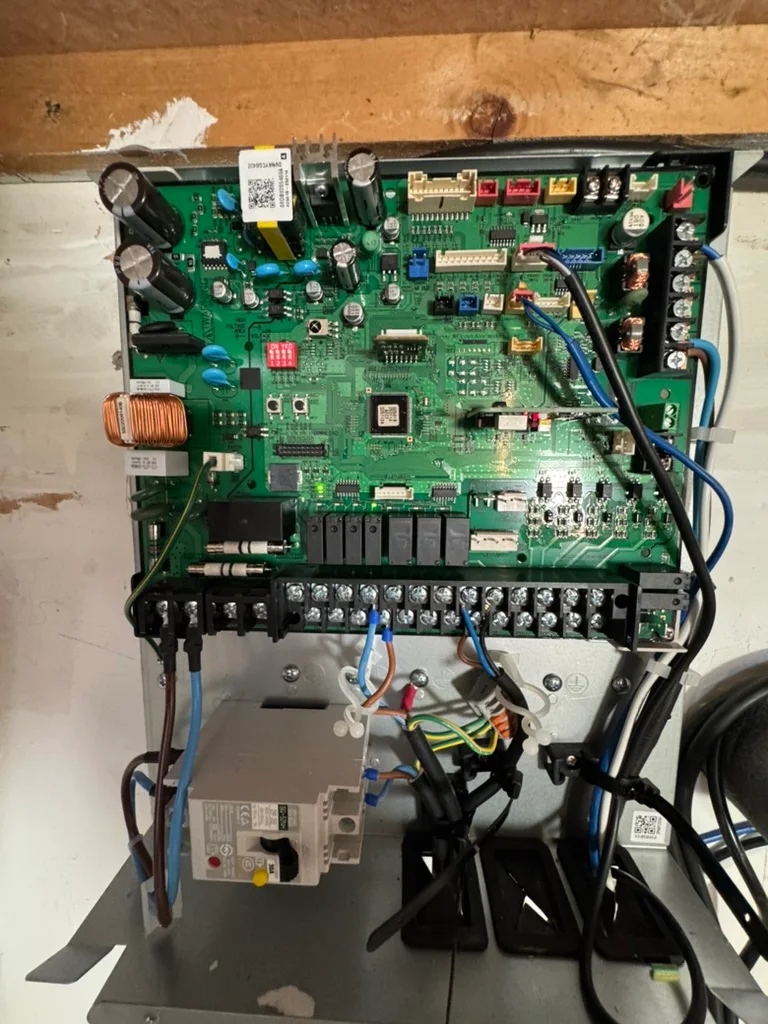
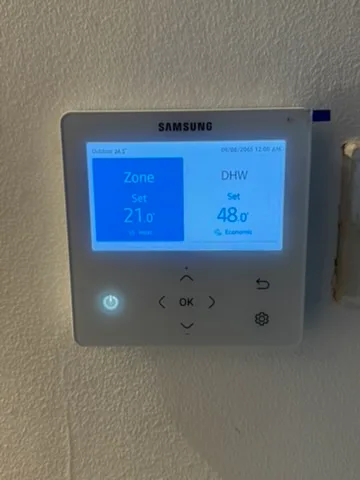
This colour wired-controller style, associated with the MWR-WW10N family, is familiar from earlier Samsung systems too. The pump wiring arrangement shown here applies to Gen 5, Gen 6 and Gen 7. Use the terminal labels and matching wiring-centre instructions to identify connections, not the room controller's appearance alone.
Which terminals should a fixed-speed pump use?
On the Samsung Gen 5, Gen 6 and Gen 7 control-kit arrangement shown below, a fixed-speed primary pump uses B7 for neutral and B8 for live. A PWM pump uses B1/B6 for power plus a separate control signal. The MIM-E03CN/MIM-E03EN manual also documents these two alternatives.
Electrical work for competent installers. Before opening the wiring centre or changing connections, safely isolate all relevant supplies, prevent reconnection and prove dead. The system can have more than one supply. Do not work from a controller “off” screen or copy wire positions from a photograph.
| Pump arrangement | Supply terminals | How it stops |
|---|---|---|
| Fixed-speed / AC pump | B7: neutral B8: live | The switched supply controls operation. |
| Compatible PWM / inverter pump | B1: neutral B6: live | A separate PWM signal and reference connection control the pump. |
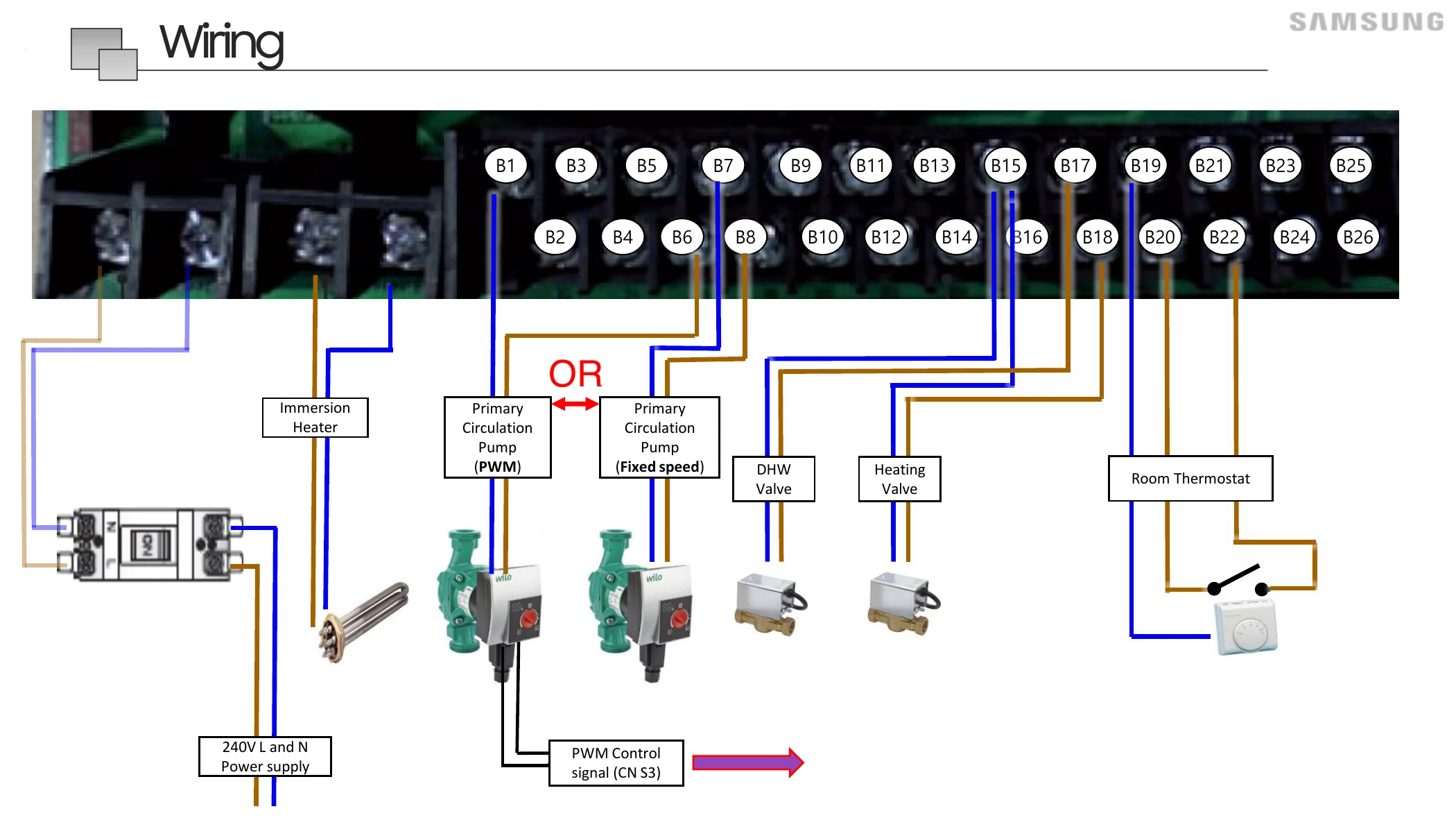
The training slide labels the PWM signal connector CN S3. Connector names can differ between board versions: follow the fitted board's signal and reference markings and matching manual. The B7/B8 fixed-speed connection does not need that separate PWM signal.
The manual calls B7/B8 the “additional water pump” connection, then shows it under “Case 2: AC pump”. That wording can make the correct connection less obvious when you are looking for the primary circulation pump.
The CN/EN manual gives a 1 A maximum for the terminal set. Check the applicable application diagram, pump load and starting current: a separate supply and correctly designed relay arrangement may be needed. This is not permission to connect any size pump directly to the board.
A pump with selectable speeds or internal pressure control is not necessarily a PWM-controlled pump. Check how the particular pump receives its stop/start command.
A PWM pump needs more than a power cable
PWM means pulse-width modulation. The mains cable supplies power; the separate signal tells a compatible pump when to run and at what speed. If the signal is missing, the pump does not necessarily stop.
For example, Grundfos UPM3 instructions explain that a pump using the heating PWM profile A runs at maximum speed without a signal. On the wrong wiring arrangement, that leaves water circulating after the Samsung controller has requested a stop.
The engineer needs to check that the signal cable is fitted at both ends, the signal and reference connections are correct, and the pump is using the right control profile. Not every PWM pump behaves the same way: solar PWM profiles can have different no-signal behaviour.
The order I would check an E912 fault
For a new installation, or a fault starting immediately after pump work, establish how the pump is being controlled first. If the wiring is correct, move on to the other possible causes. E912 does not prove which component is at fault.
- Identify the equipment. Record the outdoor model, wiring-centre model, pump model and whether it is fixed-speed or externally PWM-controlled.
- Compare command with actual operation. Check Operation status > Water pump on the controller. A pump that starts immediately when the wiring centre is powered and keeps running while its status is off points towards the supply or control wiring. Allow for normal protection routines; an on-screen off status is not electrical isolation.
- Check supply and signal wiring. After safe isolation, verify the fixed-speed output or the complete PWM arrangement against the matching diagram.
- Trace every pump in the system. Confirm primary and secondary pumps have not been connected to the wrong outputs or fed through another control.
- Only then investigate components. Follow the model's diagnostic procedure for the pump control, flow sensor and PCB. Verify the repair through a full operating and stopping cycle.
| Finding | What the engineer checks next |
|---|---|
| Another pump is running | Whether it drives water through the heat pump's monitored circuit. A hydraulically separated secondary circuit does not automatically do this. |
| Pump remains on with correct wiring | The control signal, external feeds/relays and board output. A stuck relay is possible, but check before condemning the PCB. |
| Flow is reported but water is not moving | The flow sensor or switch, its wiring and the board input, following the relevant service procedure. |
Samsung's service diagnostics include extra-pump, flow-switch and board faults. Do not bypass the flow sensor to suppress the error.
What you can check without opening anything
If this is your newly installed heat pump, send the installer a photograph of the E912 display and explain when it appears. Tell them if it started from first use or after work on the pump.
- Record whether heating, hot water or both have stopped working.
- Take a short video if the circulation pump can be heard running continuously.
- Photograph the controller's Operation status screen showing the water-pump status, and tell the installer whether the pump started immediately when power was last restored.
- Photograph accessible equipment labels without removing electrical covers.
- Keep a note of when the fault returns after any installer-advised reset.
The photos above are here to help identify the equipment, not to suggest that you open the wiring centre. Repeated resetting will not fix the wrong pump connection. Do not leave the system electrically isolated in freezing weather as a routine workaround; ask your installer how to protect it while the fault is resolved.
For an older system, tell us about the fault before arranging heat-pump servicing in Lincolnshire. Fault finding needs time allocated to it, rather than being assumed to fit into a normal maintenance visit.
Samsung E912 questions
Will resetting a Samsung heat pump clear E912?
A reset may clear the display temporarily, but it will not correct a permanently running pump or missing PWM signal. Record the code before resetting and follow the instructions for your controller. If E912 returns, investigate the cause rather than repeatedly resetting it.
Is E912 a low-flow fault?
No. E912 means flow is being detected while the pump command is off. E911 is the insufficient-flow fault while the pump is commanded on. Check the full code before following advice about air, filters or pump speed.
Can a missing PWM cable cause E912?
Yes. A heating-profile PWM pump can run continually when its mains supply is connected but its control signal is missing. The engineer needs to check the signal connection, polarity and pump control profile, not just whether the pump has power.
Do I need to replace a fixed-speed pump with a PWM pump?
Not simply because E912 has appeared. The MIM-E03CN/MIM-E03EN manual provides an AC-pump arrangement as well as a PWM arrangement. First check whether the installed pump is suitable for the system and connected to the correct control output.
Does this pump wiring apply to Samsung Gen 5, Gen 6 and Gen 7?
Yes, for the control-kit arrangement shown here. The fixed-speed primary pump uses B7 neutral and B8 live across Gen 5, Gen 6 and Gen 7. The Gen 6 training slide shows the same arrangement used on my Gen 7 installation. Check the fitted board and matching manual, especially the PWM signal connector and pump-load limits.
What if the system has worked for years before showing E912?
Ask whether a pump, controller or wiring has recently changed. If nothing has changed, the engineer should also investigate the pump control, an additional pump, the flow sensor and the board. An old installation should not automatically be diagnosed as an original wiring mistake.
Need help with a Samsung heat pump?
For a new installation, ask the installing engineer to check the pump control wiring first. For a heat-pump problem in Lincolnshire, send Vector Heat the fault code, model details and what the pump is doing.
For ongoing care, our guide explains what a heat-pump service should include. If you are planning a new system, see our heat-pump installation service.
Technical sources
The wiring diagram is from Samsung's Gen 6 Mono training handouts dated 2 June 2022, PDF page 41. This pump arrangement applies to Gen 5, Gen 6 and Gen 7 systems with the control-kit layout shown. Samsung installation manual DB68-08471A-09 covers MIM-E03CN/MIM-E03EN; the application diagrams are linked near the top. Grundfos supplies the PWM profile example.
Other diagnostic possibilities are shown in Samsung's older E912 service flowchart; use the service instructions for your exact model. HSE's electrical-safety guidance explains safe isolation and competence.